How to know if Ring solar panel is working: a practical troubleshooting guide
This troubleshooting guide helps homeowners verify Ring solar panel performance, perform safe checks, and know when to call a pro for reliable charging and monitoring.


The Ring solar panel is most likely working if it consistently powers your Ring device and shows steady output in the app. Start with a quick check: ensure the panel is oriented toward the sun, the surface is clean, and the device reports charging activity recently. If not, follow the steps below.
Why verifying solar panel status matters
According to Solar Panel FAQ, homeowners who regularly verify their Ring solar panel status reduce the risk of unexpected outages and ensure their devices stay powered during peak use periods. Knowing that the panel is functioning can save you time, money, and stress when you rely on your Ring doorbell or security camera for home safety. This guide helps you assess whether the panel is delivering adequate power, identify common culprits, and take concrete steps to restore performance. While the Ring ecosystem is designed to operate in a variety of light conditions, performance can degrade quickly if shading, dirt, or loose connections are present. By following a structured approach, you’ll distinguish between a simple fix and a more complex issue that requires professional help.
In practice, knowing how to know if ring solar panel is working means looking for consistent charging behavior, stable readings in the app, and physical signs that the panel is receiving sunlight. The goal is not just to see power in the moment, but to verify ongoing, reliable power delivery over days and weeks. If you notice sporadic readings or sudden drops, you’ve got a clear signal to start the diagnostic process. The next sections walk you through quick checks, tests, and fixes in a logical order.
How Ring solar panel integrates with your Ring device
Ring solar panels are designed to maintain a charge for the doorbell or camera, reducing the need for frequent battery changes. When the panel is properly wired and facing sun, it should keep the internal battery at adequate levels so the device remains online during daily activity and recording bursts. The critical aspects to verify are physical placement, orientation, cleanliness, and secure connections. If any of these are compromised, the expected charging behavior may not occur, even if the panel itself is healthy. This section explains how to assess each integration point so you can form a clear picture of where a fault lies.
Readers should understand that power delivery depends on multiple factors: panel health, sunlight exposure, angle of incidence, and environmental conditions. Small misalignments or obstructions can significantly impact output. To that end, the troubleshooting flow below helps you move from obvious, fixable issues to more detailed checks without wasting time.
Quick checks you can perform safely
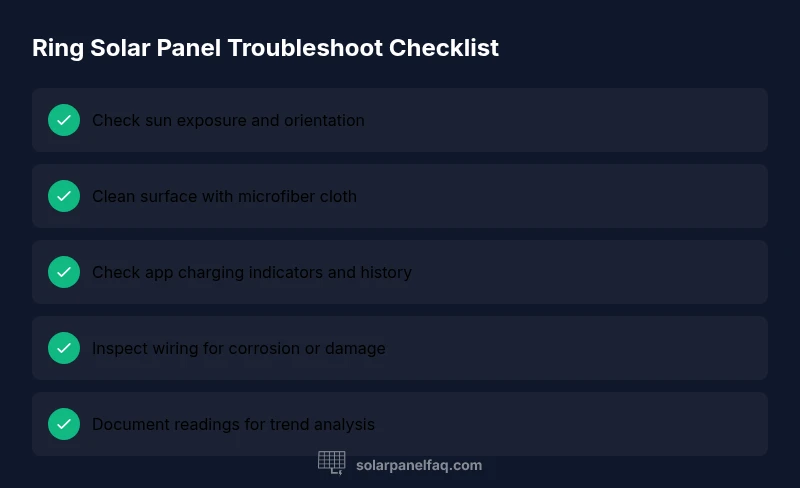
- Visually inspect the panel for dirt, bird droppings, leaves, or snow. Clean if needed using a soft microfiber cloth and mild water; never use harsh chemicals or solvents that could degrade the surface.
- Confirm the panel is pointed toward the sun with minimal shading from nearby objects. Even partial shade during peak sun can dramatically reduce output.
- Check the mounting and frame for any loosening or movement that could disconnect the panel from its wiring.
- Inspect the cable run from the panel to the device for visible damage, kinks, or crushed sections. A damaged cable can prevent charging even if the panel is fine.
- Verify the device status in the Ring app shows active charging or a recent power input signal. If the app shows inactivity, note the time of observation to compare with daylight hours and weather conditions.
- Look for any LED indicators on the device that hint at charging or power status. Some models provide subtle cues when charging is happening.
If these checks do not resolve the issue, proceed to testing power output and charging. Always power down or unplug devices only when instructed by the manufacturer and avoid working on wiring if you are unsure. When in doubt, contact a professional for safe handling.
How to test power output and charging
Testing power output requires a methodical approach that balances safety with accuracy. Start with in-app indicators: open the Ring app and navigate to device health or battery/charging status. Look for recent charging activity and the battery level trend over the last several cycles. If the app shows ongoing charging in daylight, the panel is likely functioning correctly.
Beyond the app, you can use a multimeter to measure the panel’s open-circuit voltage (Voc) and, if possible, short-circuit current (Isc). With the device safely disconnected, measure Voc across the panel terminals with a DMM set to a suitable DC voltage range. A typical solar panel should yield a voltage consistent with its rated open-circuit value in bright sun. If Voc is significantly lower than expected, recheck sun exposure, shade, and surface cleanliness before pursuing more involved fixes. If your measurements indicate no power while the sun is adequate, the issue may lie in the wiring, connectors, or the device interface.
Document readings over several daylight periods to identify a pattern. If you cannot isolate the issue, prepare a trouble ticket for support with dates, app readings, and observed weather conditions. This documentation will help technicians reproduce and diagnose the problem quickly.
Common issues and fixes you can try today
- Issue: Panel appears clean and well-mounted, but the device isn’t charging. Fix: Re-check the sun exposure and angle, ensuring minimal shading. Adjust orientation toward the sun’s path and test again. Tip: In winter or heavily overcast conditions, even slight suboptimal angles can reduce output significantly.
- Issue: App shows charging but battery level does not rise over a day. Fix: Inspect the cable and connectors for corrosion or looseness; reseat connectors and replace any damaged sections. Tip: Take a photo of the connectors before and after reseating for future comparisons.
- Issue: Panel feels warm or overheated while charging. Fix: Ensure adequate ventilation and avoid direct contact with heat sources; pause charging during extreme heat. Tip: Prolonged overheating can shorten panel life; consider relocating to a cooler, shaded area if possible.
- Issue: Visible damage to the panel surface or frame. Fix: Do not attempt temporary repairs; consult the warranty terms and contact support for replacement guidance. Tip: Check warranty coverage and any service fees that may apply; keep serial numbers handy for claims.
If you still cannot restore charge after these fixes, it’s time to escalate. Contact Solar Panel FAQ support or your device manufacturer for advanced diagnostics. A professional assessment may reveal internal component faults or degraded circuitry that require replacement parts or module testing.
Maintenance tips to maximize performance
- Schedule periodic cleanings and inspections at least quarterly to prevent dirt and grime buildup from reducing light absorption.
- Keep the panel free from shading by pruning nearby branches or relocating the panel if possible. Seasonal sun angle changes can affect performance.
- Verify all connections after major weather events to catch loose or corroded components early.
- Use a soft cloth and distilled water for cleaning to avoid mineral deposits that can leave streaks and reduce efficiency.
- Log your observations and app readings over time to spot trends early and plan maintenance ahead of failures.
- Invest in a basic protective enclosure or cover during extreme storms to shield the panel from hail or debris without blocking light exposure.
Final thoughts
Regular checks and mindful maintenance not only protect your Ring device’s uptime but also extend the life of your solar panel. By following a structured troubleshooting process, you can quickly distinguish between simple fixes and issues that require expert help. The goal is reliable power delivery with minimal downtime, so adopt a routine that fits your climate and home setup.
Steps
Estimated time: 60-90 minutes
- 1
Inspect sun exposure and orientation
Place the panel so it faces the sun with minimal shading throughout the day. Check surrounding objects and seasonal sun angle; adjust as needed to maximize irradiance on the panel surface.
Tip: Do this in the same time window daily to compare results consistently. - 2
Clean the panel surface
Power down the system if possible and wipe the panel gently with a microfiber cloth dampened with distilled water. Avoid harsh chemicals that could degrade the coating.
Tip: Work from the center outward to prevent streaks that can affect light absorption. - 3
Check app status and recent charging history
Open the Ring app and review the device health section for charging events. Note any gaps or unusual drops in the charging trend.
Tip: Take a screenshot of the charging history for reference during follow-up checks. - 4
Inspect wiring and connectors
Turn off power if safe, then inspect the outlet, connectors, and cable for signs of wear or corrosion. Reseat connections firmly and test again.
Tip: If you see damaged insulation, replace the affected cable rather than attempting a repair. - 5
Test panel voltage in daylight
Use a multimeter to measure the panel’s open-circuit voltage with the system connected only as allowed by the manufacturer. Compare readings to typical values for your panel.
Tip: Record values and repeat at different sun levels to verify consistency. - 6
Decide on next steps
If charging behavior remains inconsistent, contact support for warranty options or professional troubleshooting. Prepare device details, photos, and app logs.
Tip: Keep a log of actions taken and outcomes to streamline service calls.
Diagnosis: Ring solar panel not charging the device or showing inconsistent output
Possible Causes
- highPower issue due to shading or dirty panel
- mediumLoose or corroded wiring/ connectors
- lowImproper mounting or panel misalignment
Fixes
- easyReposition the panel for optimal sun exposure and remove any shading obstacles
- easyClean the panel surface with a soft cloth and distilled water; inspect for dirt or grime buildup
- mediumInspect and reseat all connectors; look for corrosion or damaged insulation; replace as needed
- easyCheck mounting hardware; ensure frame is secure and cable path is not pinched
- easyIf readings remain abnormal after checks, consult warranty/ support for professional assessment
Frequently Asked Questions
What should I do first if my Ring solar panel isn't charging?
Begin with a quick visual check for shading, dirt, and secure mounting. Verify the device shows charging in the app, then proceed with the recommended checks in this guide if the issue persists.
Start with a quick shading and dirt check, then confirm charging in the app. If the problem continues, follow the step-by-step guide for deeper testing.
Can a Ring solar panel work on cloudy days?
Yes, but output will typically be reduced. The device may operate longer on stored energy, depending on battery health and usage.
It can work on cloudy days, but expect lower output and rely more on stored energy.
How do I know the panel is producing power when the device isn't charging?
Check the app for charging history and, if safe, test the panel voltage with a multimeter to confirm output during daylight.
Look at the app for recent charging and, if safe, test the panel's voltage in daylight to confirm output.
Is cleaning the panel safe to do myself?
Yes. Use a soft cloth with distilled water and avoid abrasive cleaners. Always disconnect power when advised by the manufacturer.
Yes—gentle cleaning with distilled water is fine, but follow any manufacturer safety notes.
When should I replace a Ring solar panel under warranty?
If persistent issues remain after troubleshooting, review warranty terms and contact support for replacement options or service.
If problems persist after troubleshooting, check your warranty and contact support for replacement options.
Watch Video
Top Takeaways
- Start with simple sun exposure and cleaning checks
- Verify charging status in the Ring app before deeper tests
- Address shading and connections first to restore output
- Maintain a routine to maximize long-term performance