How to Check If Your Solar Panel Is Working
A practical, step-by-step guide for homeowners to verify solar panel performance, diagnose issues, and maintain efficiency with safe, actionable tests and monitoring tips.


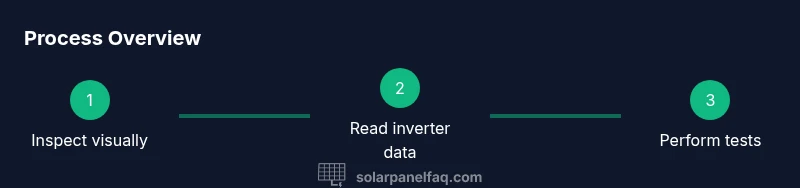
This quick check helps you confirm whether your solar panels are producing power. You’ll visually inspect for cracks or shading, review inverter monitoring data, and perform basic electrical checks such as measuring open-circuit voltage (Voc) and short-circuit current (Isc). Gather a multimeter, safety gloves, a DC clamp meter, and a clear, dry working area.
Visual health check: how to check solar panel working or not
In this guide, you’ll learn a practical approach to determine whether your solar panels are functioning as intended. Start with a visual assessment, then move to monitoring data and simple electrical tests. This process helps homeowners spot common issues early and prevents unnecessary downtime. Remember, the goal is to identify obvious problems, confirm normal operation where possible, and know when to call a pro.
Read the inverter and monitoring data
Modern solar setups include an inverter and an online or local monitoring display. Begin by checking the inverter for any fault codes or warning lights. Compare the current production with the system’s expected output on the monitor for the same time of day and weather. Look for stable, consistent readings rather than sharp, unexplained drops. If you notice a sustained deviation, document the time and conditions and proceed to the next steps. The inverter often provides a quick snapshot of DC side production, and the AC side reading helps you understand usable energy delivered to your home.
Safe electrical measurements you can perform
Electrical testing on PV arrays should be approached with caution. Always prioritize safety: wear PPE, ensure dry conditions, and avoid touching exposed conductors. When you are ready to test, use a multimeter to check the open-circuit voltage (Voc) across the positive and negative terminals of a panel string with the sun shining. If you have a DC clamp meter, you can measure current (Isc) without disconnecting the circuit. Never perform live tests on panels that are wet or damaged, and disconnect the system according to manufacturer guidelines before doing more intrusive checks.
Baseline performance and weather considerations
Solar production varies with sun exposure, panel orientation, and temperature. To assess performance, compare readings to the system’s baseline under similar conditions (same time of day, season, and weather). If you consistently see lower output than the baseline, investigate potential shading, soiling, or equipment issues. Use historical data from the monitoring system to identify trends, such as gradual declines that might indicate dirt buildup, degraded panels, or aging components rather than a one-off anomaly.
Troubleshooting common issues
Common culprits for reduced performance include shading from nearby trees or debris, soiling on panel surfaces, loose wiring, or problems with the inverter. Start with the easiest fixes: trim obstructions, clean panels with water if safe to do so, and reseat connectors if you notice corrosion or loose fittings. If readings don’t align with expectations after these checks, inspect bypass diodes, fuses, and DC disconnects. When in doubt, clean documentation and a structured checklist help you communicate clearly with a technician.
Maintenance and cleaning to maximize output
Regular maintenance preserves efficiency. Clean panels when dust, pollen, or bird droppings accumulate (prefer dry days or cool hours to avoid cracking). Use a soft brush or sponge and minimal detergent if necessary, then rinse with clean water. Inspect hardware for corrosion, loose mounts, or cracked frames. Keep the area around the electrical equipment clear for safe access and prevent accidental damage to panels and wiring. A proactive cleaning routine often reveals issues before they become costly repairs.
Interpreting graphs and daily trends
Energy graphs show how production shifts with weather and seasons. Look for a consistent daily pattern that mirrors sun exposure; unexpected dips may indicate shading, panel degradation, or inverter issues. Compare weekday vs weekend performance to uncover irregularities that could hint at partial shading or connection problems. If the line is noticeably flatter than expected during peak sun, consider a more detailed diagnostic, possibly including a professional inspection.
When to call a professional and how to document issues
If you observe persistent underperformance, unusual inverter fault codes, or suspected wiring damage, contact a licensed solar technician. Gather evidence: monitor screenshots, inverter error codes, dates and conditions of abnormal readings, and photos of wiring or panel surfaces. A professional can perform advanced tests such as string-level current measurements, insulation resistance checks, and thermographic imaging to locate hidden faults, while advising on warranty coverage if applicable.
Quick-start checklist for homeowners
- Check inverter display for fault codes and verify daily production vs expected.
- Do a visual inspection of panels, wiring, and mounting for damage or shading.
- If safe, perform a Voc test across a string and note the value; use Isc if you have a clamp meter.
- Compare readings to baseline data and recent weather conditions.
- Document everything and plan a professional inspection if anomalies persist.
Tools & Materials
- Multimeter (DC voltage and current capable)(Choose a meter rated for PV arrays; ensure proper safety ratings for the expected voltages.)
- DC clamp meter (optional for current tests)(Useful for measuring current without breaking the circuit.)
- Safety gloves and safety glasses(Non-conductive gloves recommended; eye protection essential.)
- Inverter access (display or app)(Have reads handy for real-time production and fault codes.)
- Non-conductive ladder or stable stepping stool(Only if you need to reach the panels safely and cannot do so from ground level.)
- Soft brush or microfiber cloth and clean water(Use only as needed for surface cleaning; avoid harsh detergents.)
- Camera or smartphone for documentation(Capture conditions, wiring, and shading for reference.)
Steps
Estimated time: 60-90 minutes
- 1
Prepare and safety-check the area
Before touching any equipment, switch off the DC disconnects as per the manufacturer’s instructions and ensure you have dry conditions. Verify that you have a clear path to the inverter and emergency contact if needed. Stabilize your ladder and wear PPE.
Tip: Always test for dry surfaces and work with a partner when accessing rooftop panels. - 2
Perform a visual inspection of panels
Look for cracks, discoloration, delamination, or signs of micro-cracking on glass and frames. Check for dirt, bird droppings, or shading from nearby trees. Document any issues with photos and note their locations.
Tip: Shading from even small obstructions can drastically reduce output; note any seasonal changes. - 3
Check inverter status and monitoring
Read the inverter display for fault codes. Log the current daily production and compare it to expected values for the time of day. Access the monitoring app or software to corroborate on-site readings with remote data.
Tip: If you see a fault code, consult the manual or manufacturer support site before proceeding. - 4
Measure Voc across a representative string
With the sun bright, place the multimeter probes on the positive and negative terminals of a panel string and record the open-circuit voltage. Do not disconnect wiring; follow the safety instructions in the manual.
Tip: Do not touch exposed conductors; keep the meter probes away from metal surfaces. - 5
Measure Isc or current under load
If you have a clamp meter, clamp around the conductor to measure current while the system is energized. If you must disconnect, follow all safety steps and only do so for short, planned test intervals.
Tip: Current tests should be performed with the panel string under typical operating load. - 6
Compare results to baseline and weather conditions
Cross-check Voc and Isc values against the system’s documented specifications and the day’s weather. Look for readings that align with expected ranges and for any persistent deviations that persist across multiple days.
Tip: Keep a log to identify gradual declines that indicate aging components or potential faults. - 7
Evaluate shading and soiling impact
If you notice reduced output, re-check for new shade sources or surface soiling. Use a shade test by temporarily obscuring small portions of the panel to see how output responds. Note how critical each area is to total production.
Tip: Repeated shading from the same object at different times of day suggests structural changes may be needed. - 8
Decide on next steps and document
Summarize findings with photos, readings, and dates. If persistent issues remain after cleaning and basic checks, schedule a professional inspection or consult the warranty terms.
Tip: A clear, dated report speeds up service calls and supports warranty claims.
Frequently Asked Questions
What signs indicate a solar panel might not be working?
Common signs include a sudden drop in energy production, visible damage to panels, error codes on the inverter, or unusual readings that don’t match sun exposure. Start with a visual check and inverter data before scheduling a professional assessment.
Look for sudden production drops, visible panel damage, or inverter error codes. Start with a visual check and monitor data before calling a technician.
Can I test solar panels without climbing on the roof?
Yes. Most checks can be done from the ground by examining inverter readings, monitoring data, and performing string voltage tests on accessible points. Roof-side testing requires safety precautions and usually professional assistance.
Most checks can be done from the ground through inverter data, but roof-side tests require safety and possibly a pro.
How do I tell if the issue is with panels or the inverter?
If the inverter shows fault codes or the output is inconsistent with sun exposure, inspect the wiring and panels first. Persistent discrepancies after cleaning and tests often indicate panel or bypass diode issues, which a pro should diagnose.
If inverter codes appear or outputs don’t match sun, check wiring and panels first. When in doubt, call a professional.
Should I clean panels before testing?
Light cleaning to remove dust or debris can improve performance and should be part of routine maintenance. Avoid harsh cleaners and high-pressure washing that could damage the glass or seals.
A light cleaning can help; avoid harsh cleaners or high-pressure washing that could hurt the panels.
When should I call a professional?
If readings remain abnormal after basic checks, if you suspect wiring damage, or if your system is under warranty, arrange a professional inspection. They can perform advanced tests safely and verify warranty eligibility.
Call a professional if readings stay off after checks or if you suspect wiring damage or warranty needs.
Do shading and temperature affect performance?
Yes. Shading reduces output significantly, even if only part of a panel is shaded. Temperature also affects efficiency; hot days can lower performance, so consider both factors when evaluating numbers.
Shading reduces output; high temperatures can also reduce efficiency. Consider both when evaluating results.
Is there any safety risk in testing my solar system?
There are safety risks when working with live DC circuits. Always switch off disconnects, wear PPE, and avoid testing in wet conditions or if you’re unsure of the procedure.
Testing can be risky; switch off power, wear PPE, and don’t test in wet conditions.
Watch Video
Top Takeaways
- Inspect visually before testing to catch obvious problems.
- Use inverter data and monitoring as a baseline for performance.
- Perform safe electrical checks with proper PPE and procedures.
- Call a professional for complex diagnostics or warranty-based issues.