How to Check Solar Panel Output
Learn how to check solar panel output, interpret inverter data, compare readings to specs, and troubleshoot common issues to maximize home solar performance.


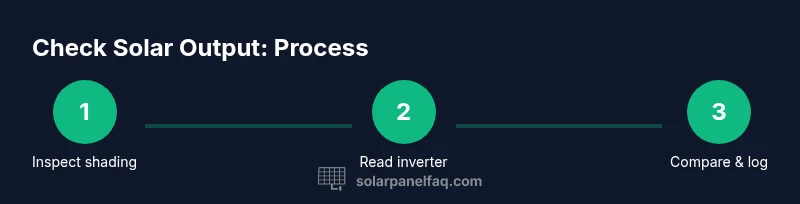
To check solar panel output, you’ll verify current system readings, compare them to expected performance, and inspect factors like shading and temperature. Gather a multimeter, a solar meter, and access to your inverter data, then follow a basic check flow to spot anomalies. This step-by-step approach helps homeowners confirm production and pre-empt issues.
Why Checking Solar Panel Output Matters
Regularly checking solar panel output helps you verify that your system is performing as expected, safeguard your investment, and catch issues before they escalate. According to Solar Panel FAQ, monitoring output isn't just for power users; it provides practical, early-warning signals that can save money and extend system life. The Solar Panel FAQ team found that even modest shading, soiling, or aging components can measurably reduce production, especially during peak sun hours. By understanding your baseline performance, you can distinguish normal fluctuations from real problems. In this section, we explore what output means in a home solar setup, how it should behave under typical conditions, and how to interpret differences between today’s data and your system’s rated capacity. The goal is to give homeowners an actionable framework for regular checks, so you can protect your investment and maximize return on solar.
Understanding Output and Baseline Performance
In a residential solar system, “output” refers to the electrical power produced by the solar array, typically measured in watts (W) or kilowatts (kW). That raw DC power is converted by the inverter into usable AC electricity for your home. A healthy system should show a steady baseline that correlates with solar irradiance, panel temperature, and system size. Seasonal shifts, shading from trees, and even soiling on panels can alter the observed output. Establishing a baseline helps you detect when a drop in production is caused by weather versus a problem with equipment. Solar Panel FAQ notes that persistent deviations beyond expected daily and seasonal ranges warrant closer inspection. Always compare against your system’s rated capacity and account for sun angle and weather conditions when interpreting results.
Measurements, Units, and What They Mean
Key measurements include DC voltage (V), DC current (A), and DC power (W) from the panels, and AC power (W) delivered to your home after inversion. The inverter display or monitoring portal often reports output in real-time along with daily and monthly totals (kWh). Temperature, irradiance (sunlight intensity), and panel orientation influence readings. Kilowatts (kW) describe instantaneous output, while kilowatt-hours (kWh) represent energy over time. When evaluating performance, you’ll want to note the time of day, weather, and any shading. Understanding these units helps you translate a single reading into meaningful, actionable insights for maintenance and optimization.
Tools You'll Need and Safety Basics
Before you start checking output, gather the essential tools and observe safety precautions. A digital multimeter (DC capable), a DC clamp meter, and a solar irradiance meter will let you measure voltage, current, and sun intensity. Access to the inverter data or monitoring portal is crucial for trends and baselines. PPE such as gloves, eye protection, and non-slip footwear should be worn when working near electrical equipment. If you’re uncomfortable with live electrical work, consult a licensed electrician or solar technician. Keeping a log of readings, times, and weather conditions will help you build a useful performance history over seasons.
Reading Inverter Data and Monitoring Dashboards
Your inverter or solar monitoring portal is the fastest way to gauge overall performance. Look for real-time output (AC) and normalized daily production. Compare today’s injection against the expected value given irradiance and system size. Historical graphs reveal trends, such as gradual declines due to panel aging or occasional spikes caused by temporary shading. If the dashboard shows unexpected dips, check for recent shading events, dirt buildup, or a module-level fault indicated by sensor alerts. Remember that microinverters or power optimizers can complicate aggregation, so consider per-string data if available to pinpoint a troublesome section.
Common Causes of Low Output and How to Diagnose
Low output typically stems from external and internal factors. External causes include shading from trees or nearby structures, soiling from dust, pollen, or bird droppings, and snow coverage. Internal issues involve wiring faults, degraded connectors, loose panel mounts, or inverter problems. Start with a visual inspection for obvious shading or debris, then verify that the inverter is functioning correctly and that there are no alarms or fault codes. If readings are consistently low across all panels, the issue often lies with irradiance or misconfiguration rather than individual modules. Solar Panel FAQ recommends methodical checks and documenting anomalies to guide you toward a fix or a professional assessment when needed.
Seasonal Effects, Temperature, and Orientation
Output naturally fluctuates with the sun’s angle, day length, and temperature. Higher panel temperatures can reduce efficiency due to the temperature coefficient of PV cells. Panels facing optimal orientation and with minimal shading generate more power, especially during peak sun hours. In spring and summer, expect higher production; in winter, shorter days and potential snow or frost reduce output. By understanding these seasonal patterns, you can set realistic expectations and plan maintenance during lower-output periods to avoid losing energy during the critical shoulder seasons.
Maintenance and Regular Checklists
A simple maintenance routine helps maintain steady output. Clean panels when dry weather is favorable and avoid cleaning in direct sunlight to prevent thermal shock or streaks that block light. Check for loose mounting hardware and ensure there’s no debris accumulating under mounting rails. Schedule biannual checks that align with seasonal changes, and keep a log of readings alongside weather conditions. Consistent documentation makes it easier to spot gradual aging or hidden faults, enabling timely interventions and better long-term reliability.
Tools & Materials
- Digital multimeter (DC capable)(Set to appropriate DC ranges; safety first)
- DC clamp meter(Measure current without breaking circuit)
- Solar irradiance meter / pyranometer(Measures sun intensity in W/m²)
- Inverter data access (monitoring portal or LCD display)(View real-time and historical output)
- Safety gear (gloves, eye protection, non-slip shoes)(Electrical work requires PPE)
- Notepad or mobile app for logging readings(Record time, conditions, and values)
- Infrared thermometer (optional)(Identify hotspots or hot spots on modules)
- Test leads/adapters for direct DC reading (optional)(Use only if you know how to safely access strings)
- Smartphone with monitoring app (optional)(Fetch live data or export CSVs)
Steps
Estimated time: 30-90 minutes
- 1
Prepare safety and plan
Review the system layout, check for exposed wiring, and put on PPE. Plan readings for a consistent time window when irradiance is steady. Confirm you have access to inverter data and the monitoring app.
Tip: Never touch live conductors; work with the system de-energized if safe to do so. - 2
Access inverter/monitoring data
Open the inverter display or login to the monitoring portal to view current output, daily production, and any fault indicators. Note the time and weather conditions for context.
Tip: Take screenshots if your portal supports export to log for later analysis. - 3
Record baseline readings
Record DC voltage across a representative string, DC current, and the AC output shown by the inverter. Use the same points each time to ensure comparability.
Tip: Document irradiance if you can measure it. - 4
Measure irradiance and environment
Use a solar irradiance meter to capture sun intensity. Note temperature and shading from nearby objects. These factors help explain deviations from baseline.
Tip: Take readings within a 5–10 minute window around solar noon for best comparability. - 5
Compare against expected output
Calculate expected output using system size and irradiance, then compare with observed values. Look for consistent gaps that suggest a fault or environmental impact.
Tip: If outputs are consistently lower, inspect shading, soiling, or module orientation. - 6
Document and plan action
Log all readings, note anomalies, and decide whether a DIY adjustment is sufficient or if a professional assessment is needed.
Tip: Prioritize any safety concerns; resolve those before deeper diagnostics.
Frequently Asked Questions
What is considered a normal solar panel output?
Normal output varies by system size and sun conditions. Establish a baseline under clear skies and compare against irradiance for the day. If readings are consistently low relative to similar days, investigate shading, soiling, or equipment faults.
A normal output depends on your system and sun conditions. Start with a baseline on a sunny day, and compare to irradiance. If you’re consistently low, check shading, dirt, or equipment faults.
How often should I check solar panel output?
Check outputs during seasonal changes or after events like heavy pollen, snow, or storms. Regular monthly or quarterly checks build a reliable performance history. Use notable weather days as reference points.
It's best to check after seasonal changes or notable weather events, about monthly or quarterly to build a good performance history.
Can I safely check output without specialized tools?
You can read inverter data and monitor panels through the system portal, which is safe and informative. Direct DC measurements require caution and appropriate equipment; avoid touching exposed conductors unless you are trained.
You can safely read the inverter data through the portal. Direct DC checks require caution and proper tools; avoid exposed conductors if you’re not trained.
Why does output vary during the day?
Output varies with sun angle, irradiance, temperature, and shading. Peak production usually occurs near solar noon under clear skies. Weather changes, cloud cover, and temperature fluctuations cause short-term fluctuations.
Output changes with sun position, weather, and temperature. It peaks around solar noon and drops with clouds or heat.
What steps should I take if my output is low?
First verify shading and dirt on panels, then check the inverter and connections for fault indicators. If readings remain low after cleaning and inspections, consult a licensed technician to assess wiring, wiring harnesses, and module health.
If output is low, check shading and dirt, inspect the inverter and connections, and consider professional help if the issue persists.
Should I clean panels to improve output?
Cleaning can improve output if dirt or pollen blocks light, especially in dry climates. Use water and a soft sponge on cool panels, avoid harsh cleaners, and schedule during dry, cool periods to minimize thermal shock.
Cleaning helps if dirt blocks light. Use gentle methods, avoid harsh cleaners, and do it during cool, dry times.
Watch Video
Top Takeaways
- Establish a baseline to compare future checks.
- Use consistent tools and conditions for accuracy.
- Shading and dirt are common causes of low output.
- Inverter data is a quick diagnostic anchor.
- Regular checks protect performance and value.