Broken Solar Panel Troubleshooting: Severe Weather Guide
Urgent guide to diagnose and fix a broken solar panel after severe weather. Get safe steps, identify common causes like debris or loose wiring, and know when to call a pro. From Solar Panel FAQ.


Step 1: Prioritize safety and shut down the system, then perform a quick external check for obvious damage. Step 2: If debris is visible or wiring appears loose, address only safe, non-live components. Step 3: Debris, loose wiring, or a tripped inverter are the most common culprits after severe weather; decide if a DIY check is feasible or if you should call a pro.
Why Severe Weather Impacts Solar Panels and What to Expect
Severe weather—especially events associated with a tornado siren, high winds, hail, or flying debris—can affect solar installations in unexpected ways. Even when panels appear intact, microscopic cracks and microfractures can form, reducing efficiency or causing intermittent shading. A broken solar panel tornado siren madness scenario can lead to sudden drops in output, uneven performance across strings, and warning codes on the inverter. For homeowners, the key is recognizing that weather-related stress is often cumulative: a few small cracks can worsen over time, new connections can loosen, and fast-moving debris can dislodge protective covers. Throughout 2026, Solar Panel FAQ analyses emphasize a practical, safety-first approach to triage, focusing on visible damage, system status indicators, and a conservative plan for further inspection or professional help.
Immediate Safety First: What to Do Right Now
Safety comes before anything else. If you hear crackling, see smoke, or notice a hot component, evacuate the area and call emergency services if needed. Do not touch exposed wiring or damaged modules while the system is powered. If it is safe to do so, switch off the inverter at the disconnect switch and shut down the array from the emergency stop per your system’s manual. After securing safety, inspect for obvious external damage from a distance: cracked glass, displaced mounting hardware, or debris on glass surfaces. Keep children and pets away until a licensed technician confirms safe conditions. This quick, deliberate pause minimizes risk and buys you time to determine the next steps.
Common Causes After a Tornado: Debris, Loose Connections, Inverters
After a violent weather event, several issues are common culprits for reduced or zero output. Debris (dust, leaves, rubble) can shade panels or press on glass, degrading performance. Loose or damaged wiring and connectors are another frequent factor, especially if wind gusts jostled the racking or exposed cables to moisture. Inverters can trip due to overvoltage, overheating, or internal faults caused by a surge or vibration. Understanding these causes helps you triage efficiently: start with the simplest visual checks and move toward electrical checks only if you are confident and trained.
How to Inspect Your System Safely and Effectively
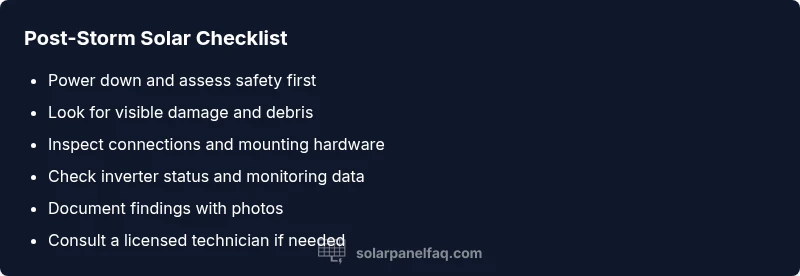
Begin with non-contact visual checks from a safe distance: look for broken glass, loose mounting hardware, or panels that appear misaligned. If you see nothing obvious, inspect the inverter display for error codes or flashing lights—refer to the manual for code meanings. Check accessible DC cables for signs of wear or corrosion, and verify that conduit protects cables from the elements. If you have a monitoring app, review recent alerts and production trends. Do not attempt to open junction boxes or access live terminals unless you are a certified technician. Document findings with photos for your technician.
Diagnostic Flow: Symptom → Diagnosis → Solutions Path
When you notice decreased output, begin with the simplest checks: confirm system safety, inspect for visible damage, and review monitoring data. If output abruptly improves after a simple fix (like clearing debris), you’ve identified the culprit. If not, progress to checking wiring continuity, insulation, and the inverter status. Cross-check with the system’s warranty terms and your local codes. If a software reset is advised in your model’s manual, perform it only after basic safety checks. This flow keeps you logical and organized through complex weather-related faults.
Step-by-Step: Cleaning, Tightening, and Basic Repairs
- Power down and isolate the solar array to prevent electric shock. 2) Remove loose debris gently with a soft brush or cloth—do not scrub hard. 3) Inspect rails and mounting hardware; tighten any visibly loose bolts with the appropriate tool. 4) Check accessible DC connections for signs of corrosion or loosening; reseat connectors firmly. 5) If the inverter indicates an error, note the code and consult the manual or a technician. 6) Restore power and monitor output to confirm improvement. Safety notes: never work on live circuits; wear PPE; avoid wet conditions. Pro tip: take before/after photos to document changes for the technician.
Testing After Repairs: Verify Output and Monitor Trends
After any fixes, re-enable the system using the proper safety procedure and observe the production data for several hours. Compare current output to expected baselines under similar sun conditions. If production remains significantly below baseline, recheck connections and consider a more thorough inspection or service. Use the monitoring app to track voltage, current, and string-level performance; discrepancies across strings can indicate a damaged panel that may require replacement under warranty.
When to Replace Panels or Inverters and How to Decide
If visible damage is extensive or if performance does not recover after fixes, replacement could be the best long-term option. If your panels are older, or if a storm caused micro-cracks that shorten lifespan, replacement becomes a cost-benefit calculation. Review warranty terms for coverage on physical damage and performance degradation. Consult a licensed tech to assess whether an inexpensive repair now can extend overall system life, or if a complete upgrade is warranted.
Steps
Estimated time: 45-60 minutes
- 1
Ensure safety and shut down
Power down the system using the main disconnect switch and inverter emergency stop. Verify no live DC voltage is present before touching any components.
Tip: Always wear insulated gloves and stand on a dry surface. - 2
Visual inspection from a distance
Look for obvious damage, loose mounts, or debris on panel surfaces. Do not climb on rooftops if you’re not trained.
Tip: Take photos for documentation before touching anything. - 3
Inspect wiring and connections
Access only safe, non-live components to check for loose or corroded connectors. Reseat and secure as needed according to the manufacturer.
Tip: Avoid over-tightening connectors. - 4
Check inverter and monitoring data
Review error codes and lights on the inverter and check monitoring software for downed strings or clues.
Tip: Note codes before contacting support. - 5
Test power after reassembly
Restore power following the manual and observe for improved output. Record baseline and current production.
Tip: If no improvement, do not push further—call a pro. - 6
Decide on replacement or professional service
If debris damage or micro-cracks are evident, weigh repair vs replacement; warranties may cover certain failures.
Tip: Keep warranty documents handy.
Diagnosis: System shows reduced or zero output after a severe weather event
Possible Causes
- highDebris covering or shading panels
- mediumLoose or damaged wiring/connectors
- mediumInverter fault or tripped safety switch
- lowStructural damage to mounting or panels
Fixes
- easyGently remove debris and clean the panel surfaces from a safe distance
- easyInspect and reseat DC connectors; tighten mounting hardware if loose
- easyCheck inverter status lights and error codes; perform a reset if approved by the manual
- mediumCall a licensed technician for a thorough inspection and potential panel replacement
Frequently Asked Questions
What could cause my solar output to drop after a tornado or severe weather event?
Damage from debris, loose wiring, or inverter faults are common culprits after storms. Start with a safety shutdown and visual check before deeper diagnostics.
After severe weather, look for debris, loose connections, or inverter faults as the usual culprits. Begin with safety steps and a quick visual check.
Do I need a professional for troubleshooting after such events?
If you identify obvious damage, water exposure, or complex electrical issues, contact a licensed technician. For simple debris removal and reseating connectors, basic safety guidelines may suffice.
If you see obvious damage or unsure about electrical work, call a licensed technician. For simple, safe checks, follow the safety steps first.
Can a weather event cause a panel to fail permanently?
Yes, severe impacts can cause micro-cracks that worsen over time or panel delamination. Warranty coverage varies; check terms and document incidents.
Severe impacts can cause micro-cracks or delamination. Check your warranty terms and document the incident for claims.
What should I document after a storm?
Take clear photos of panels, mounts, and wiring; note dates, weather conditions, and any error codes. This helps when consulting a pro or filing a warranty claim.
Photograph all damage, note dates and codes, and keep a record for service or warranty claims.
Is it safe to clean panels if there’s visible debris?
Only clean from the ground or a safe ladder base with the system shut down. Avoid climbing on the roof if you lack training and protective gear.
Clean from ground level if safe, with the system off. Don’t climb roofs unless you’re trained and equipped.
What maintenance can prevent future outages?
Regular inspections, prompt debris removal, secure mounting, and monitoring data checks help prevent long outages after storms.
Do regular checks, clear debris, secure mounts, and monitor performance to prevent future outages.
Watch Video
Top Takeaways
- Identify safety threats before any checks
- Debris, loose wiring, and inverter faults are the top causes
- Use a step-by-step diagnostic flow to avoid guesswork
- Know when repairs should be DIY vs. professional