Why Solar Panels Fail During Power Outages: A Practical Troubleshooting Guide
Learn why solar panels often stop during outages and how to add backup power safely. This guide covers anti-islanding, backup options, steps to implement a compliant solution, and practical tips for homeowners in 2026.


Grid-tied solar panels typically won't power your home during a blackout because the inverter automatically shuts down to prevent backfeeding to the grid. Backup power requires battery storage or an islanding-capable inverter installed by a professional. If you want outage power, plan a compliant backup solution and confirm utility requirements with your installer.
Understanding the outage rule and anti-islanding safety
When homeowners ask why don’t solar panels work during a power outage, the short answer lies in safety protocols and utility rules. Most residential solar installations are grid-tied, meaning they feed surplus energy back to the public grid. To protect utility workers and prevent backfeed, inverters automatically disconnect from the grid when the utility grid trips offline. This behavior is commonly referred to as anti-islanding. According to Solar Panel FAQ, this built-in safety mechanism is not a defect but a required standard, designed to ensure that anyone working on the grid isn’t surprised by live power. For homeowners, this means that without a backup energy storage system or an inverter designed for islanding, your solar array won’t continue to deliver power during an outage. Understanding this baseline is essential before you consider upgrades or add-ons. It also highlights the importance of planning beyond the solar modules themselves.
From a practical perspective, you’ll want to map out which loads matter most (refrigeration, medical devices, lighting) and decide whether a battery, a generator, or a hybrid approach best fits your home. In 2026, many homeowners are reevaluating backup needs as grid reliability becomes a growing concern. The Solar Panel FAQ team emphasizes that the fastest path to outage readiness often starts with a clear goal for essential-load support and a realistic assessment of your current system’s capabilities.
Backup options: batteries, inverters, and hybrids
A critical next step is choosing backup technology that aligns with your goals and local code requirements. Battery storage paired with a hybrid or islanding-capable inverter provides true outage power by isolating your home from the grid while preserving safety. Standalone generators can supply power but require fuel, regular maintenance, and proper transfer switching to prevent backfeeding. Hybrid systems blend solar with batteries and an intelligent inverter to optimize charging and discharging based on load and solar input. When evaluating options, consider the following: (1) Do you already have a grid-tied solar system with a capable inverter? (2) Is there space and budget for home battery storage? (3) What is your acceptable level of inconvenience during outages? The Solar Panel FAQ team notes that many homeowners underestimate the costs and complexity of executing a robust backup plan, particularly if permits or electrical panel upgrades are needed.
Debunking myths: grid-tied vs off-grid capabilities
A common myth is that you can simply flip a switch and keep the house running from solar power during a blackout. In reality, grid-tied systems rely on the grid for safety and stability, and most cannot island without a specialized inverter and controls. Off-grid solar systems can power a home during outages, but they are engineered differently, with battery banks and independent microgrids. It’s a mistake to assume that adding more panels will automatically deliver power during a outage; the critical factor is energy storage capacity, control logic, and the ability to isolate from the grid. The Solar Panel FAQ perspective in 2026 stresses that a well-designed backup solution requires careful integration with your electrical panel, transfer switches, and load priorities to avoid safety risks and code violations.
This section helps dispel the belief that “more solar equals more outage power.” If your goal is continuous operation during grid loss, you must pursue dedicated backup hardware and professional installation.
Diagnosing your system's outage readiness
To determine whether your system can support essential loads during a blackout, start with a simple assessment of what exists today and what’s legally required to enable safe operation. List critical devices (refrigerator, lights in key rooms, sump pump, Wi-Fi router) and estimate total wattage. Check whether your inverter is configured for backup/ islanding mode, and verify that a transfer switch or other interlock is installed to separate your home from the grid. If your system doesn’t meet these criteria, it will not supply power during outages, even if there is abundant sun. Solar Panel FAQ recommends consulting a licensed electrician to review code compliance, equipment compatibility, and the feasibility of adding batteries or a dedicated backup inverter. In 2026, many homeowners discover that the missing piece is a formal backup architecture rather than more solar panels alone.
Next, assess battery state of health, inverter firmware, and interconnection with your electrical panel. A faulty battery or outdated inverter can render even a robust solar array incapable of feeding the home during an outage.
Step-by-step: planning a compliant backup installation
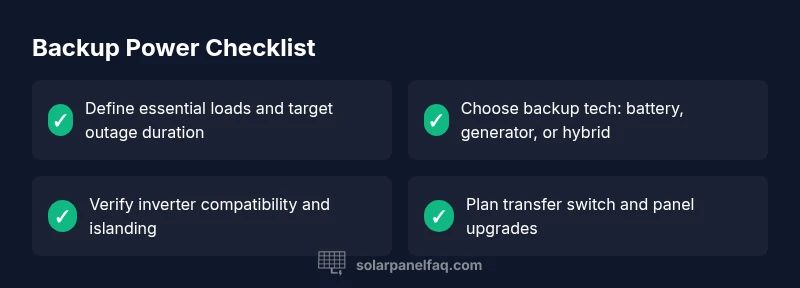
Planning a compliant backup setup involves a structured, step-by-step approach. Step 1: Define essential loads and establish a target outage duration. Step 2: Decide on a backup technology—battery storage, generator, or both. Step 3: Verify inverter compatibility and confirm islanding capability with your installer. Step 4: Add or upgrade to a transfer switch so critical circuits can be isolated from the grid. Step 5: Obtain permits and ensure utility interconnection requirements are met. Step 6: Schedule professional installation by a licensed electrician or solar installer. Step 7: Run thorough safety tests, including automatic transfer switching and load prioritization checks. Throughout this process, document safety procedures and maintenance plans. > Pro tip: A phased approach can reduce upfront costs while you validate backup performance over time.
Safety concerns and professional help you should seek
Safety cannot be overstated when dealing with backups. Working with high-voltage DC and AC systems requires proper training and protective equipment. Do not attempt to modify inverters, connect batteries directly to the panel, or bypass interlocks. Always hire licensed electricians and, if required, a solar installer with experience in backup architectures. Utilities may impose specific safety rules for backfeeding and islanding, so obtain written guidance and approvals before you begin. The risk of electrical shock, fire, or code violations is real when attempting DIY backup configurations. By engaging professionals, you protect your home, protect utility workers, and safeguard your device warranties.
Maintenance and prevention: staying outage-ready for the long term
Finally, plan for ongoing maintenance to preserve outage readiness. Schedule periodic battery health checks, inverter firmware updates, and safety-tested transfer switches. Create a maintenance calendar that includes a battery SOC check, verifying charge/discharge cycles, and rebalancing energy storage as needed. Prepare a simple incident log to track outages and performance, so you can adjust your backup capacity over time. An effective maintenance routine reduces the risk of unexpected outages and keeps your home ready when the grid fails. The Solar Panel FAQ team emphasizes prevention as the best medicine—regular checks can prevent large, unexpected failures and extend the life of your backup system.
Steps
Estimated time: 90-120 minutes
- 1
Assess backup goals and essential loads
Begin by listing essential devices and estimating required outage duration. Prioritize loads (refrigeration, lighting, safety devices) and set a target for how long you want to keep them powered. This will guide your equipment choices and budget.
Tip: Create a simple load list with wattages to avoid oversizing. - 2
Choose backup technology
Decide between battery storage, a generator, or a hybrid approach. Batteries offer quiet operation but higher upfront cost; generators are cheaper upfront but require fuel and maintenance. A hybrid can balance both.
Tip: Consider your climate, noise tolerance, and space for battery banks. - 3
Check inverter compatibility
Confirm your inverter supports islanding or has a dedicated backup mode. If not, plan for an upgraded inverter or a separate backup system that can safely disconnect from the grid.
Tip: Ask for an islanding-capable model with a documented warranty. - 4
Plan electrical upgrades
Install a transfer switch or interlock kit to isolate your home from the utility when the main grid goes down. This step prevents backfeeding and complies with safety rules.
Tip: Have your electrician verify panel space and busbar capacity. - 5
Permitting and utility approvals
Obtain all necessary permits and sign off from your local utility. Clear documentation reduces delays and ensures compliance with codes and safety standards.
Tip: Keep digital copies of permits for future inspections. - 6
Professional installation
Hire a licensed electrician or solar installer with backup experience. They will install equipment, verify wiring, and test the system under simulated outage conditions.
Tip: Ask to see the installer’s certification and warranty terms. - 7
Test and verify operation
Run a thorough outage test, verify automatic transfers, and confirm that critical loads power reliably. Document results and adjust load prioritization as needed.
Tip: Schedule quarterly tests to maintain readiness.
Diagnosis: House loses power during a grid outage even though solar panels are installed
Possible Causes
- highNo energy storage or backup inverter
- highInverter not configured for islanding/backup mode
- highUtility requires anti-islanding shutdown; system not allowed to island
- lowOverloads on critical circuits or improper transfer switch wiring
- mediumBattery state of charge depleted or battery fault
Fixes
- hardInstall a battery storage system with islanding-capable inverter
- mediumConfigure or upgrade to an inverter with islanding/backup capability
- mediumAdd a proper transfer switch and rewire for critical loads
- easyReview utility interconnection requirements and enable safe shutdown settings
- easyPerform routine battery maintenance and ensure adequate state of charge
Frequently Asked Questions
Why do solar panels stop generating power during a power outage?
Most grid-tied solar systems shut down during outages to prevent backfeeding and protect utility workers. This is a safety feature, not a flaw. Backup power requires an approved storage or islanding setup.
Grid-tied systems shut down during outages to protect workers; you need a backup solution to power essential loads.
What is islanding, and can I enable it safely?
Islanding is when a system operates independently of the grid. It requires specialized inverters and controls, plus code approvals. Without proper equipment, enabling islanding is unsafe and typically not permitted.
Islanding lets your system run off-grid, but you need approved hardware and permits to do it safely.
Can I install a backup battery myself?
Backups involve high voltage, complex interconnections, and code compliance. A licensed electrician or solar installer should perform the installation to protect people and warranties.
No—backup systems should be installed by a licensed professional to stay safe and maintain warranties.
Will solar power any critical load during an outage without storage?
Only if the system includes backup hardware like a battery or a dedicated backup inverter. Standard solar panels without storage do not power during outages.
No—storage or a dedicated backup inverter is needed for outage power.
What are the typical costs to add backup power?
Costs vary widely based on capacity, equipment, and permits. Expect a range that reflects the size of the backup system, with price influenced by battery or generator choices.
Costs depend on capacity and equipment; consult a pro for a tailored estimate.
How long does installation and testing take?
A typical backup upgrade can take from several hours to a day, depending on existing panels, electrical space, and local permitting. A professional can provide a precise timeline.
Expect a few hours to a full day, depending on your setup and permits.
Watch Video
Top Takeaways
- Plan backup power before outages occur
- Standard grid-tied systems won't power loads during outages
- Backup storage is essential for true outage power
- Work with licensed professionals to stay safe
- Regular maintenance keeps your backup ready