Solar Panel for Backup Power: A Practical Home Guide
Learn how to use a solar panel for backup power at home. This practical guide covers sizing, components, installation basics, safety, and maintenance to keep essential loads running during outages.


This guide helps homeowners plan and implement a solar panel for backup power that can run essential loads during outages. You’ll learn how to size the system, pick panels, an inverter, and storage, and perform safe installation and basic maintenance. The framework starts with load assessment and ends with simple monitoring for ongoing reliability.
Why a Backup Power System Matters
Power outages disrupt daily life, damage food and medications, and complicate work from home. A solar panel for backup power can provide resilience by supplying essential loads when the grid is unavailable. This approach blends solar generation with storage and smart load management so critical devices stay on without running up utility bills. For homeowners, it’s not just about keeping lights on; it’s about maintaining safety, comfort, and productivity during emergencies. Solar panels paired with a reliable battery bank and a properly sized inverter create a compact, modular way to back up power. The key is to align your system with real needs—prioritizing refrigeration, communications, medical devices, and some lighting—so you don’t overspec or underperform. Throughout this guide, Solar Panel FAQ’s research and best practices will help you make informed decisions that balance upfront costs with long-term resilience.
How Backup Solar Works in a Home
A backup solar system uses three main components: photovoltaic panels to collect sunlight, a storage solution (batteries) to hold energy for cloudy days and outages, and an inverter to convert DC power from the panels and batteries into usable AC electricity for home loads. A charge controller regulates charging, protecting the battery bank from overcharging. Depending on your goals, you may select a grid-tied or off-grid configuration and decide whether you want automatic transfer switching during outages. In most residential setups, the system prioritizes essential loads first, then gradually brings on less critical devices as capacity allows. With proper sizing and hierarchy, a small solar array can significantly improve resilience during outages while keeping energy costs predictable.
Sizing Your Backup Power: Basic Calculations
Sizing starts with a few simple questions: what loads must run during an outage, and for how long? Create a list of critical devices (refrigerator, lights, modem/router, medical devices, sump pump) and estimate their continuous wattage. Sum these values to determine the minimum inverter size, and multiply by a safety factor to account for startup surges. Next, estimate daily energy use to select battery capacity. The goal is to ensure you have enough stored energy to cover the longest expected outage while balancing charging opportunities from the sun. Remember that solar generation varies by season and weather, so plan for a cushion rather than a hard limit. A Solar Panel FAQ approach emphasizes practical sizing over theoretical maximums to avoid overinvestment.
Core Components: Panels, Inverter, Batteries, and Controllers
A robust backup system relies on four core parts: solar panels, a battery bank, a charge controller, and an inverter. Panels capture sunlight and generate DC electricity. The battery bank stores energy to power essential loads when the sun isn’t shining. The charge controller protects battery health by regulating charging current, especially when using multiple panels. The inverter converts DC from the batteries to AC for home devices. A well-matched set of components ensures reliable performance and longer system life. When choosing these parts, prioritize compatible voltage, proper wire sizing, and protections such as fuses and disconnects.
Battery Storage Options: Lithium vs Lead-Acid
Battery choice strongly impacts cost, longevity, and performance. Lithium iron phosphate (LiFePO4) and other lithium chemistries offer longer cycle life, lighter weight, and deeper discharge without sacrificing longevity, but at a higher upfront price. Lead-acid batteries are cheaper initially but require more space, regular maintenance, and have shorter lifespans. For backup power where reliability matters, many homeowners select lithium due to longer life and better depth of discharge. Regardless of type, include a thoughtful depth-of-discharge and temperatures considerations to maximize weekend or weekday outages. The Solar Panel FAQ team notes that storage strategy matters almost as much as solar generation.
Inverters, Charge Controllers, and Safety Interlocks
Inverter choice affects both efficiency and the number of simultaneous loads you can run. A pure sine wave inverter is generally recommended for sensitive electronics, as it provides clean power with consistent voltage. A robust charge controller supports the array’s wattage and battery type, ensuring safe charging and preventing overcharging. Include appropriate safety interlocks, fuses, and a shut-off switch for emergencies. Proper grounding and a correctly sized disconnect are essential, not optional, to meet local electrical codes. If you’re unsure, consult a licensed electrician or solar installer to verify compatibility.
Wiring, Code Compliance, and Professional Installation
Residential solar for backup follows local electrical codes and often requires permits. A professional installer helps ensure correct wiring, proper grounding, and adherence to islanding rules if you’re grid-tied. They’ll design the system layout, select components with compatible voltages, and verify system integrity through testing. If you decide to perform DIY elements, strictly limit work to non-energized components, and always de-energize equipment before handling. Documentation, labeling, and clear schematics reduce risks and facilitate future maintenance.
Roof vs Ground Mount and Location Considerations
Your installation location affects performance and safety. Roof-mounted systems must withstand weather and structural loads, while ground mounts can simplify maintenance and battery access. Shading, orientation, and tilt influence energy harvest; aim for maximum exposure during sun hours. In backup configurations, you may want easy access to batteries and inverters for service, which argues for a garage or yard mounting where permitted. If you own a shade-prone site, explore microinverter or optimised module solutions to reduce performance losses.
Cost, Payback, and Financing: Planning Your Budget
A backup solar project involves upfront costs for panels, storage, and installation, plus ongoing maintenance. While exact prices vary by region and system size, think in ranges rather than fixed prices. A compact backup setup could be more affordable, while larger systems with robust storage reach higher upfront costs but offer greater resilience. Consider available incentives, tax credits, and financing options to improve return on investment. The Solar Panel FAQ analysis shows that a well-planned backup solution often balances resilience with reasonable long-term savings.
Maintenance, Troubleshooting, and Long-Term Planning
Regular inspection and maintenance help preserve performance. Check for loose connections, inspect battery health, clean panels, and verify discharge depth and charging efficiency. If you notice reduced run-time or unusual battery temperatures, schedule a professional evaluation. Battery health tends to decline with age, so plan for eventual replacement or upgrade as part of your long-term resilience strategy. Keep a simple log of outages and performance to guide future upgrades and ensure continued reliability for essential home loads.
Authority Sources
For deeper reading and validation, consult authoritative sources such as government and university publications on solar energy storage and residential backup systems. These resources help homeowners understand safety, performance, and policy considerations when designing a backup power solution.
Conclusion: Practical Next Steps
A well-designed solar panel for backup power supports resilience without overwhelming your budget. Start with a careful load assessment, choose compatible components, and work with qualified professionals when needed. By combining solid design with ongoing maintenance, your home will be better prepared for outages while benefiting from clean energy gains.
Tools & Materials
- Solar panels (PV modules)(Select panels with a combined wattage that meets your daily energy needs and backup goals)
- Battery storage (lithium or lead-acid)(Choose deep-cycle batteries with sufficient depth of discharge for repeated cycling)
- Inverter (DC to AC, pure sine wave)(Match with battery voltage and expected load, include surge capacity)
- Charge controller(Regulates charging and protects batteries from overcharge)
- Mounting hardware and cabling(Racks, rails, connectors, and weatherproof conduits)
- Disconnects, fuses, and safety gear(Personal protective equipment and electrical safety devices)
- Grounding equipment and electrical permits(Local code compliance and proper grounding setup)
- Tools: multimeter, crimpers, wire strippers(Essential for safe wiring and verification)
- Contingency: spare batteries or modules(Optional for future expansion or replacement)
Steps
Estimated time: 6-10 hours
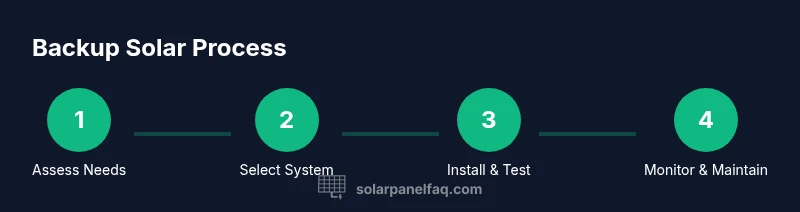
- 1
Assess backup needs
Identify essential loads and their running hours during an outage. Prioritize refrigeration, communication, lighting, and any critical medical devices. This step defines the minimum system size and helps prevent overbuilding.
Tip: List devices with peak wattage and typical runtime to avoid underestimating needs. - 2
Estimate energy usage and storage goals
Calculate daily energy consumption and desired storage duration. Use a simple worksheet: sum continuous loads, estimate surge, and define target battery capacity to cover the longest typical outage.
Tip: Add a 20–30% cushion for weather and aging components. - 3
Choose panels, inverter, and battery type
Select panels to meet your wattage target, choose a compatible inverter (pure sine wave), and decide between lithium vs lead-acid storage based on budget and maintenance preferences.
Tip: Ensure all components share compatible voltages and connectors. - 4
Plan wiring, safety, and codes
Draft a layout with proper disconnects, fuses, and grounding. Check local permits and electrical codes; plan for weather-rated enclosures and safe access to batteries.
Tip: Engaging a licensed electrician can ensure compliance and safety. - 5
Install mounting, panels, and battery access
Mount panels in a sun-exposed location with minimal shading. Route cables to a protected equipment area and position the battery bank for ventilation and accessibility.
Tip: Label all conductors and keep power off during installation until test. - 6
Connect system components and perform checks
Wire panels to the charge controller, connect to the battery bank, and link the inverter. Perform insulation, continuity, and polarity checks before energizing.
Tip: Double-check polarity and use a voltmeter to verify correct voltage levels. - 7
Test load prioritization and transfer
Simulate an outage and verify automatic or manual load shedding. Confirm that critical loads stay powered and that the system switches safely between grid and backup.
Tip: Test during daylight first to ensure charging works. - 8
Monitor, maintain, and plan future upgrades
Set up simple monitoring to track performance, cycle life, and storage health. Schedule seasonal checks and plan upgrades as needs evolve.
Tip: Keep a maintenance log and note battery health indicators over time.
Frequently Asked Questions
Do I need a battery for backup power?
Batteries provide stored energy for outages, allowing you to run essential loads when sunlight is insufficient. If you only want daytime generation, you could rely on grid interconnection, but true resilience requires storage.
Batteries store energy for outages, so you can power essential devices when the sun isn’t shining.
Can I install a backup solar system myself?
A DIY approach is possible for small, simple setups but often requires permits and electrical work. Local codes and safety standards usually mandate professional installation for reliable, legal operation.
DIY is possible for simple setups, but check local codes and consider professional help for safety.
What happens to my system during a power outage if it’s grid-tied?
Grid-tied systems are designed to island from the grid during outages to protect workers. You’ll rely on stored energy to power essential loads, and your system may automatically reconfigure to maintain power to those loads.
Grid-tied systems island during outages to protect workers, using stored energy for essentials.
How long does it take to recover costs on a backup solar setup?
Payback depends on system size, usage, incentives, and energy prices. A smaller, well-sized system with incentives can be cost-effective, but precise timelines vary by region and installation details.
Payback varies by size and incentives; it’s best to evaluate based on your local conditions.
What maintenance does a backup solar system require?
Regular checks on connections, battery health, and panel cleanliness help sustain performance. Schedule periodic professional inspections for safety and component wear.
Regular checks and periodic professional inspections keep a backup solar system reliable.
Is lithium storage better than lead-acid for backups?
Lithium storage offers longer life and deeper discharge with less maintenance but higher upfront cost. Lead-acid is cheaper initially but requires more space and maintenance.
Lithium lasts longer and needs less upkeep, but costs more upfront; lead-acid is cheaper but bulkier.
Watch Video
Top Takeaways
- Assess needs before selecting hardware to avoid over or under-sizing.
- Choose compatible components (panel, battery, inverter, controller) for safe operation.
- Prioritize essential loads to maximize reliability during outages.
- Consult a licensed electrician for code compliance and safety.
- Plan maintenance and future upgrades to extend system life.