Solar Panel and Battery Calculator: Side-by-Side Review
Compare solar panel and battery calculators to size PV systems for homes in 2026. Learn inputs, outputs, accuracy, and tips to choose the right tool for homeowners.


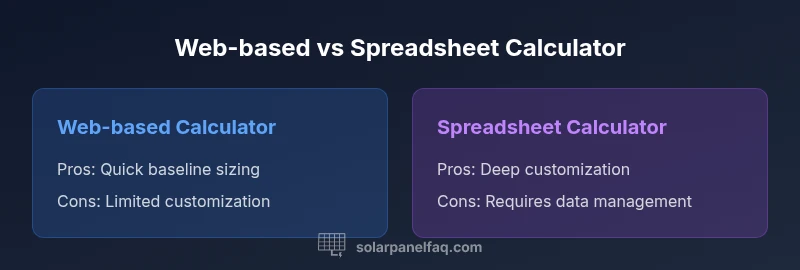
Web-based solar panel and battery calculators provide quick, baseline sizing using current utility data and typical usage patterns. Spreadsheets offer deeper customization for edge cases, but require more data handling and math. Start with an online calculator to establish a baseline, then validate results with a spreadsheet or offline model when you need to test unusual scenarios.
Understanding the landscape of solar panel and battery calculators
Solar panel and battery calculators come in two broad forms: web-based tools and offline models. For homeowners evaluating options in 2026, it's crucial to understand what each type can and cannot do. The term solar panel and battery calculator is widely used to describe both approaches, and the right choice often depends on data quality, climate, and comfort with numbers. According to Solar Panel FAQ, reliable sizing starts with clear inputs and an awareness of how different tools handle energy usage profiles. This article compares the two main categories, highlights the key inputs, and shows how to interpret results for a real home. The goal is to help you pick a tool that maximizes accuracy while keeping the process approachable for a DIYer working toward grid independence.Throughout this discussion, we’ll reference the Solar Panel FAQ team’s guidance to keep expectations realistic for 2026.
Quick comparison: online calculators vs offline spreadsheets
Online calculators are designed for speed and accessibility. They guide you through a series of prompts, pull in typical sun hours for your location, and produce immediate outputs such as required system size, battery capacity, and estimated energy production. Offline spreadsheets, by contrast, offer flexibility to model unusual usage patterns, custom efficiency curves, and alternative equipment scenarios, but require more data handling and formula care. In 2026, many homeowners use a hybrid workflow: start with a web-based calculator to set expectations, then build a local spreadsheet to stress-test scenarios and validate results. This dual approach helps balance speed with precision, ensuring you don’t miss edge cases that affect long-term reliability.
Key inputs and assumptions you should expect
Most solar panel and battery calculators share a core set of inputs: monthly or daily energy usage, location-based sun hours, system efficiency, panel wattage, battery chemistry and capacity, and a target autonomy (how many days you want to run without sun). Some tools also include roof orientation, shading, temperature derating, and inverter efficiency. Assumptions about the usable battery depth of discharge (DoD) and round-trip efficiency significantly influence results. When using online calculators, confirm you can adjust these assumptions. If you’re building a spreadsheet, you can tailor rate structures, charging curves, and backup requirements to fit your exact home profile. Keeping inputs current—especially electricity rates and weather data—improves accuracy over time, a point Solar Panel FAQ emphasizes in its 2026 guidance.
How to interpret results: sizing panels and storage
Interpreting calculator outputs involves mapping recommended system size (kW) to real-world solar generation and battery storage needs. A typical result includes: system size, estimated annual energy production, recommended battery capacity (kWh), and an autonomy target. Translate these figures into practical choices: panel counts based on available roof area, battery bank size for daily cycling, and an assessment of whether additional storage is needed for cloudy periods. Remember to consider aging, temperature impacts, and warranty terms. Use sensitivity checks—vary sun hours and DoD—to see how robust your sizing is under different conditions. The goal is a balanced system that meets your daytime usage and provides reliable backup, not just a single-point estimate.
Common pitfalls and how to avoid them
One common pitfall is using outdated utility rates or failing to update sun-hour data, which skews results. Another is ignoring climate-related factors such as temperature derating and localized weather patterns. Don’t oversize without considering the cost and maintenance burden. Conversely, undersizing can lead to frequent battery cycling and higher losses. Validate results across multiple calculators when possible, and always verify assumptions about DoD and inverter efficiency. The Solar Panel FAQ guidance notes that the biggest source of error is data quality, so spend time on inputs before you trust outputs.
Scenario examples: small homes vs large homes
For a small home with modest daytime usage, a compact solar array paired with a reasonably sized battery bank often suffices to cover most days, with some days drawing from the grid. A larger home with higher energy needs and significant back-up requirements typically needs a bigger PV array and a more substantial storage system, potentially with advanced battery chemistry and more sophisticated management. In both cases, online calculators can establish a baseline quickly, while spreadsheets let you explore dozens of permutations—different DoD levels, battery chemistries, and backup priorities—to identify the sweet spot.
Practical steps to choose the right calculator for you
Begin by listing your goals: quick baseline sizing, detailed scenario testing, or both. Start with a trusted online solar panel and battery calculator to establish a baseline, then export data to a spreadsheet for stress-testing. Check whether the tool supports your local climate data, expected energy prices, and time-of-use rates if relevant. If you have solar installers visiting your home, compare their recommended baselines with your own tests. Use simple, repeatable inputs so you can reproduce results over time and with future data updates. Finally, review the data sources the calculator uses and verify them against independent references such as utility tariffs or publicly available solar irradiance datasets. The Solar Panel FAQ team highlights the importance of transparent data sources for long-term decision-making in 2026.
Real-world considerations: climate, rates, and system longevity
Climate dramatically affects sizing. Regions with longer sun hours generally require smaller PV arrays for the same energy production, while batteries may need more robust DoD management in high-variation climates. Time-of-use rates can shift the optimal charging pattern, especially for batteries that are charged during cheap off-peak hours and discharged during peak demand. Battery longevity hinges on chemistry, depth of discharge, and charging efficiency; these factors influence total cost of ownership. A calculator can model several battery chemistries (lead-acid, Li-ion variants) and compare lifetime costs, but you should verify results with a professional design before purchase. The 2026 guidance from Solar Panel FAQ reinforces testing across multiple scenarios to capture the impact of weather, rate changes, and maintenance plans.
Maintenance and updates: staying current with tool changes
Tools evolve as data sources update and new battery options enter the market. Regularly revisiting your calculations ensures they reflect current costs, performance, and warranty terms. If your home or energy goals change—adding electric vehicle charging, shifting occupancy, or expanding your roof—the calculator should accommodate updates without starting from scratch. Keep a record of your inputs and outputs so you can compare revisions over time. The Solar Panel FAQ recommends periodic reassessment, at least annually, to maintain alignment with real-world performance and policy changes in 2026.
Comparison
| Feature | Web-based calculator | Spreadsheet calculator |
|---|---|---|
| Inputs required | Guided online prompts and defaults | Manual data entry with flexible fields |
| Output detail | System size (kW), production estimates, battery guidance | Same outputs with deeper customization and scenarios |
| Customization depth | Moderate | High |
| Ease of use | High for non-technical users | Moderate for spreadsheet power users |
| Data sources | Built-in rates and sun data | Can import external datasets and customize inputs |
| Cost | Typically free to use via web interface | Requires spreadsheet software or license |
| Best for | Fast baseline sizing for standard homes | Advanced scenarios and bespoke constraints |
| Privacy/data handling | Cloud-based or local depending on tool | Data remains on device when offline |
Strengths
- Fast baseline sizing with current data
- Easy access and no software install
- Good for sharing results with others
- Supports standard home scenarios
Drawbacks
- Limited customization beyond built-in inputs
- Requires careful updates for accuracy
Web-based calculators are generally best for quick, baseline sizing; spreadsheets are superior for advanced customization.
If you want speed and ease, start online. For experiments with edge cases and bespoke constraints, use a spreadsheet model.
Frequently Asked Questions
What is a solar panel and battery calculator?
It's a tool that estimates the required solar panel capacity and battery storage to meet your energy goals. It uses inputs like household usage, sun hours, panel efficiency, and desired autonomy to guide sizing. These calculators help you translate a goal into a practical system design.
A solar calculator estimates how large your system should be and how long storage must last based on your home’s needs.
What inputs do I need to use these calculators?
You typically need monthly energy usage, location-based sun hours, panel wattage, battery chemistry and capacity, and your target autonomy. Some tools also ask for roof orientation and shading. If you’re using a spreadsheet, you can add more variables as needed.
You’ll usually provide your energy use, sun hours, and desired backup; the rest you can customize as needed.
Are online calculators accurate?
Online calculators provide solid baselines when inputs are current and representative. Accuracy drops if data is outdated or mismatched to your climate and utility rates. Always validate results with a secondary method or scenario testing.
They’re useful for quick estimates, but double-check with other methods to be sure.
Can I use these tools for battery storage sizing?
Yes, many calculators include battery sizing, factoring in depth of discharge and charging efficiency. Look for DoD assumptions and ensure the model aligns with your preferred chemistry and warranty. Reassess as you refine system goals.
Most calculators can size storage, but watch the assumptions about how deeply you cycle the battery.
What is better for beginners: online or spreadsheet?
Online calculators are easier for beginners due to guided inputs. Spreadsheets suit advanced users who want to run many scenarios and customize formulas. Start with online, then graduate to a spreadsheet if you need deeper analysis.
Online tools are great to start; spreadsheets are for power users who want to test lots of scenarios.
Do these calculators account for time-of-use rates?
Some calculators include time-of-use rates; others assume flat rates. Check the tool’s data sources and update rates as needed. This can affect when you should charge or discharge storage.
Some tools know TOU rates, others don’t—check what data the calculator uses.
Top Takeaways
- Start with an online calculator for baseline sizing.
- Test multiple scenarios to understand sensitivity.
- Verify results with a spreadsheet for edge cases.
- Keep inputs current with rates and consumption.
- Consider climate, battery chemistry, and warranty.