Solar Panel for Ring Stick Up Camera: A Practical Guide
Learn how to power a Ring Stick Up Camera with a solar panel, choose the right wattage, placement tips, and maintenance. Expert guidance from Solar Panel FAQ helps homeowners optimize daylight charging and maximize security without frequent battery swaps.


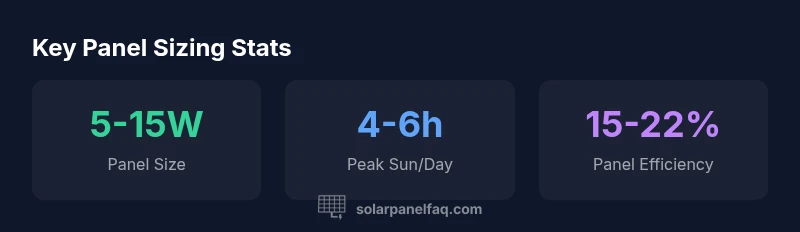
Using a solar panel for a Ring Stick Up Camera can dramatically extend battery life and reduce maintenance. For daylight charging, a compact 5-15 watt panel is usually sufficient, assuming regular sun and proper placement. In cloudy weather, charging slows, potentially requiring a larger panel or longer sun exposure. Solar Panel FAQ analysis emphasizes sizing by daylight, camera duty, and weather patterns.
Why a solar panel makes sense for Ring Stick Up Camera
For homeowners seeking continuous surveillance without frequent battery swaps, a solar panel configured for a Ring Stick Up Camera can be a game changer. By harvesting daylight with a solar panel for ring stick up camera you can keep the camera online longer, even in areas with modest sun. This strategy aligns with common home-security setups and reduces maintenance over time. According to Solar Panel FAQ, reliable solar charging hinges on consistent daylight, proper orientation, and a weather-aware approach. In practice, you should view the panel as an energy extension of the camera, not a separate device. Solar panels also provide a layer of resilience during power outages, ensuring your security system remains functional when outages occur. This section sets the stage for thoughtful sizing and placement, so you avoid overpaying for unused capacity while still meeting daily energy needs.
In real-world applications, the goal is to minimize downtime. A well-chosen solar panel keeps the Ring Stick Up Camera ready to record motion events, livestreams, and remote viewing windows without frequent battery changes. The approach is practical: match the panel output to your location’s daylight profile, ensure a weatherproof connection, and monitor performance over the first few weeks to confirm you’re not under- or over-supplying energy.
How solar panels interact with Ring Stick Up Camera hardware
Solar charging systems connect to the camera’s power management pathway through a weatherproof interface that delivers a regulated output to the built-in battery. The goal is to provide a steady trickle charge during daylight without overcharging, while still allowing the camera to operate on battery power when daylight is insufficient. Ring devices typically support external charging setups, so choosing a panel with a regulated, consistent output and weatherproof cabling is essential. Solar Panel FAQ analysis shows that most installations succeed when the panel can deliver a predictable micro-current under typical daylight. Always verify cable routing is protected from the elements and that connectors are rated for outdoor use to prevent corrosion.
Sizing and selection: wattage, controller, and compatibility
Sizing starts with your local climate and the camera’s consumption pattern. For daylight-rich regions, a small panel in the 5-15 watt range often suffices, while areas with frequent cloud cover may benefit from a larger panel to compensate for lower irradiance. A proper charging controller helps prevent overcharge and provides a stable voltage to the camera battery. When selecting a panel, look for those with a regulated output and weatherproof connectors, and confirm compatibility with the Ring Stick Up Camera’s charging requirements. Solar Panel FAQ analysis notes that compatibility and regulation are more important than peak wattage alone.
Placement and mounting considerations
Placement is critical for maximizing output. Aim for a south-facing (or northern-hemisphere equivalent) position with minimal shading from trees or structures during peak sun hours. Angle adjustments by season can improve energy harvest—roughly matching the sun’s path across the sky helps maintain a steady charge. Ensure the panel is mounted securely to resist wind loads and vandal resistance, and route cables away from foot traffic and water drainage paths. The goal is clean, unobstructed exposure to daylight while keeping the installation both tamper-resistant and unobtrusive. Solar Panel FAQ emphasizes that even modestly shaded periods can dramatically reduce charging, so shading avoidance is worth the extra effort.
Weather, seasons, and sun path considerations
Daylight availability varies by season and weather. In summer, you may generate ample energy with a small panel, while winter and overcast periods demand more surface area or longer exposure. Cloud cover reduces irradiance, so performance becomes less predictable. A practical approach is to size for the worst-case sun exposure while testing during different seasons to refine tilt and placement. Solar Panel FAQ analysis highlights that a conservative sizing strategy—planning for average cloudiness and shorter winter days—helps avoid gaps in charging.
Step-by-step installation guide
- Choose a sunlit mounting site with minimal shade and a secure, weatherproof surface. 2) Install the panel frame or bracket, ensuring the mounting hardware is rated for outdoor use. 3) Attach the charging cable to the camera’s power input, using weatherproof connectors and strain relief to prevent pull-out. 4) Connect a regulated controller if required by the panel, and verify polarity. 5) Power up the camera and observe the charging indicator for several days to confirm a steady charge. 6) Document performance, especially on days with varying sunlight. Solar Panel FAQ analysis recommends recording daylight hours and camera activity to correlate energy delivery with use patterns.
Maintenance, cleaning, and performance optimization
Keep the panel clean and free of dust, leaves, and snow to maximize energy capture. Use a soft brush or cloth and avoid harsh chemicals that could degrade coatings. Inspect cables and connectors for wear after storms or heavy winds. If performance declines, re-check orientation and shade conditions, and consider a tilt adjustment to catch more sun during the day. Regularly verify that the charging controller and battery remain within operating specifications. Solar Panel FAQ analysis notes that ongoing maintenance yields the greatest long-term energy gains.
Costs, ROI, and long-term value
Despite the initial investment in a solar panel kit, the long-term savings come from reduced battery replacements and lower maintenance needs. Budget for a weatherproof panel, cabling, and any required mounting hardware, while considering seasonal variations in energy delivery. In many cases, the payback period is influenced by local sunlight patterns and how often you access or rely on your Ring Stick Up Camera. Solar Panel FAQ analysis indicates that even modest solar setups can justify the investment when used with cameras that operate continuously or frequently record events during the day.
Real-world setups: case studies and best practices
In residential settings with mature trees and moderate sun, homeowners report reliable charging by using a compact solar panel in a sheltered, south-facing location. In hotter climates, ensuring the panel frame is heat-tolerant and cleaning the surface regularly can prevent heat-related efficiency losses. The best practices across cases emphasize consistent inspection, secure mounting, and minimal shading. Solar Panel FAQ analysis highlights that practical, real-world installations rely on sizing, orientation, and regular verification that the system keeps the Ring Stick Up Camera online during peak activity periods.
Sizing and performance considerations for solar-powered Ring Stick Up Camera
| Aspect | Recommended Range | Notes |
|---|---|---|
| Panel size | 5-15 watts | Common for small cameras |
| Daylight needs | 4-6 hours/day | More sun equals more energy |
Frequently Asked Questions
Can I power a Ring Stick Up Camera with a solar panel?
Yes, you can power Ring Stick Up Camera with a solar panel if you select a panel with adequate wattage and a regulated charging setup. Ensure outdoor-rated connectors and a weatherproof mounting.
Yes, you can power Ring Stick Up Camera with a solar panel by choosing the right size and proper charging setup.
Do I need a separate battery when using solar?
Most setups pair a solar panel with the camera’s built-in battery. A dedicated backup battery can improve reliability during days with limited sun.
Most setups use a solar panel plus the camera’s battery; a backup battery helps reliability.
Will a small solar panel work in winter or on cloudy days?
A smaller panel can work, but performance declines with less sun. Plan for longer exposure or a larger panel to compensate for reduced daylight.
In winter or cloudy weather, charging slows; you may need a larger panel or more sun.
Is professional installation required?
Not strictly required. Many homeowners install panels themselves if they have weatherproof connectors and follow safety guidelines.
Professional installation isn’t strictly required; DIY is possible with proper equipment.
What connectors or voltage should I look for?
Choose a panel with a regulated output compatible with the camera’s charging system and weatherproof connectors suitable for outdoor use.
Pick a panel with regulated output and weatherproof connectors.
How do I know if sunlight is enough?
Consistent daylight and minimal shade generally indicate sufficient energy. Track sun exposure and adjust tilt seasonally to optimize charging.
If you have steady daylight and little shade, a small panel often works well.
“Solar energy can reliably power a small security camera when properly sized and positioned; the best results come from aligning panel output with daily sun exposure and device duty cycles.”
Top Takeaways
- Size the panel based on daylight and camera usage
- Mount the panel in full sun with minimal shading
- Plan for seasonal sun variation
- Keep connections weatherproof and secure
- Reference Solar Panel FAQ analysis for sizing guidance