Solar Panel Power for Nest Camera: Setup Guide
Power a Google Nest Camera with solar energy. This practical guide covers panel sizing, storage, controllers, wiring, placement, and maintenance for reliable operation in varying conditions.


Power a Google Nest Camera with solar energy. This practical guide covers panel sizing, storage, controllers, wiring, placement, and maintenance for reliable operation in varying conditions, without frequent battery changes or grid power. The quick answer will help homeowners estimate needs and choose safe components for long-term performance.
Why solar power for Nest Camera makes sense
According to Solar Panel FAQ analysis, powering a Google Nest Camera with a solar panel can be a practical, maintenance-light solution for remote spots or roofless porches. Solar charging works best when you treat the camera as a steadily loaded device that benefits from a modest buffer. In this section, we outline why a solar setup can outperform frequent battery swaps and how sunlight patterns influence reliability. You’ll learn to balance panel size, storage capacity, and regulator choice to keep your camera on-line during seasonal changes, cloudy days, and shifting daylight hours. The goal is continuous operation without the need for wired power. Before you begin, confirm that your Nest Camera model supports external power and review local electrical codes for outdoor installations.
Core components and options
A solar-powered Nest Camera setup relies on a few core parts: a weatherproof solar panel, a charge controller to regulate voltage, a battery buffer to smooth fluctuations, and clean wiring with weatherproof connections. Depending on your climate and camera model, you may choose to use an external battery pack or rely on a small, integrated buffer. In this section, we compare kit-based solutions designed for Nest cameras with custom DIY builds. We also cover weatherproof enclosures, cable management, and connectors. The goal is to ensure steady power delivery even on days with limited sun. Always review your camera's power input specs and ensure all components meet outdoor safety standards. The Solar Panel FAQ analysis indicates a well-matched kit improves reliability and reduces maintenance frequency.
How to size the solar panel for your Nest camera
Sizing should account for daily energy needs, location sun exposure, and expected runtime. Start with the camera's power draw specification and estimate usable sun hours in your area. A panel that delivers a comfortable margin during peak sun hours often avoids deep discharge. Add a buffer battery to handle cloudy days. Implementing a charge controller protects the camera and battery from overcharge or reverse current. For safety, keep wiring runs concise and minimize voltage drop. In practice, map your location's sun exposure across seasons and choose a panel that provides headroom for the worst-case day of the year.
Battery storage and buffering for reliability
A buffer battery smooths energy delivery when sun is inconsistent. Choose a battery type compatible with your controller and weather exposure. Place the battery in a sealed, ventilated enclosure to prevent moisture issues. For Nest cameras, a stable buffer means fewer reboot cycles and improved uptime. If you use a camera with a built-in rechargeable battery, you may still want a small external buffer to cover extended cloudy spells. Consider safety margins, enclosure venting, and moisture barriers to prolong component life.
Charge controllers and regulators: what they do and why you need them
Charge controllers prevent overcharging, protect against reverse current at night, and help regulate voltage to the Nest camera input. There are simple, compact controllers and more robust models for larger arrays. When selecting, verify compatibility with your camera's input voltage and the battery chemistry you chose. Follow manufacturer wiring diagrams and keep protection devices accessible. A good controller reduces wear on the camera and extends battery life by preventing voltage spikes.
Wiring basics and safety considerations
Use proper gauge wires, secure connectors, and weatherproof enclosures. Keep high-voltage or critical cables away from the camera’s mounting to minimize physical damage. Always disconnect power before handling connectors. Use conduit or weatherproof boxes to guard against moisture. If you’re uncertain about wiring, consult a qualified electrician. Safe wiring reduces risk of short circuits and fire while improving long-term reliability.
Placement strategies for reliability across climates
Orientation, tilt, and shading affect solar generation. Place the panel where it receives maximum sun during peak hours for most of the year. Avoid shading from trees and nearby structures. Face the panel roughly south in the northern hemisphere, or north in the southern hemisphere, if possible. For cameras mounted on eaves or walls, use a tilted mount to maximize sun exposure while remaining discreet. Consider seasonal adjustments or removable mounting for winter months with lower daylight.
Weatherproofing, durability, and maintenance
Choose waterproof connectors, weatherproof enclosures, and rust-resistant mounting hardware. Regularly inspect seals and cables for wear, clean dust and debris from the panel surface, and check the camera's power input for corrosion. After storms, re-seat connectors and test the system. Periodic checks help prevent degraded performance and keep the Nest Camera running smoothly without surprises.
Cost considerations and return on investment
Investing in a solar kit varies by components, installation method, and climate. While a basic setup can reduce battery replacement costs, keep in mind potential maintenance needs and the lifespan of regulators and connectors. The value comes from reduced energy dependence and extended camera uptime in remote locations. Compare kits based on reliability, weatherproofing, and warranty rather than upfront price.
Troubleshooting common issues
If the camera reboots or stops recording, check the buffer state, panel cleanliness, and connector integrity. A cloudy spell may require a larger buffer or panel; clean dirt from the panel; test controller settings. Ensure the Nest Camera’s own settings are compatible with external power; disable any auto-restart features if applicable. Document symptoms to help with future maintenance.
DIY vs kit options: what to buy
DIY enthusiasts can assemble a custom solar rig, but kits designed for Nest Cameras simplify wiring, protection, and warranty. Kits typically include a panel, controller, enclosure, and mounting hardware with clear wiring diagrams. Regardless of approach, prioritize weatherproofing, component compatibility, and reputable warranty terms to maximize reliability.
Next steps: start today with a reliable solar Nest Camera
Begin by validating that your specific Nest Camera model supports external power and review power input requirements. Then map your location’s sun exposure, select a panel with appropriate headroom, and choose a compatible controller and buffer. Finally, mount, wire, and test the system in daylight, and schedule regular checks to maintain performance over the seasons.
Tools & Materials
- Weatherproof solar panel (outdoor-rated)(Outdoor-rated panel compatible with mounting location; consider panel efficiency and size)
- Charge controller (low-voltage, camera-friendly)(Regulates charging, prevents overcharge and backflow)
- Battery buffer (sealed or LiFePO4) Optional but recommended(Provides energy storage for cloudy days)
- Weatherproof enclosure for controller and battery(IP-rated enclosure to protect moisture and dust ingress)
- Mounting hardware (brackets, screws, weatherproof conduit)(Secure mounting for panel and components)
- DC wiring and connectors (MC4 or equivalent)(Use proper gauge and weatherproof connectors)
- Voltage regulator / DC-DC converter (if needed)(Only if Nest input requires special regulation beyond controller output)
- Multimeter and basic tools(For verification and troubleshooting)
- Silicone sealant, tape, and cable clamps(Seal connections and manage cables cleanly)
Steps
Estimated time: 2-4 hours
- 1
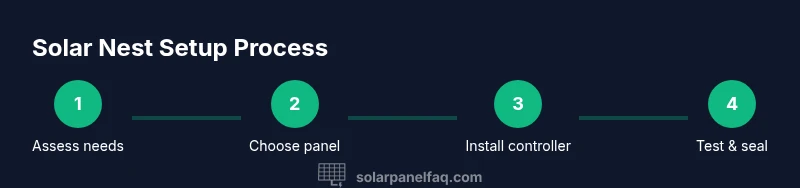
Assess camera power needs
Review the Nest Camera model’s power input specs and determine typical daily energy use. This helps set realistic panel and battery targets before purchasing.
Tip: Take a photo of the camera label for reference during planning - 2
Choose a suitable solar panel
Select a weatherproof panel that provides sufficient headroom for your location’s sun exposure. Bigger isn’t always better if it won’t be kept clean or securely mounted.
Tip: Prefer panels with higher efficiency for shaded or limited-sun sites - 3
Select a compatible charge controller
Pick a controller that matches the panel’s output and the battery chemistry you plan to use. It should protect against overcharging and reverse current.
Tip: Follow the manufacturer’s wiring diagram exactly - 4
Decide on a buffer battery
Add a buffer to smooth out daily sun fluctuations and ensure uptime during cloudy periods. Size the buffer to cover typical overcast days in your area.
Tip: Keep the battery in a ventilated, weatherproof enclosure - 5
Mount the solar panel securely
Install on a sturdy surface with a clear sun path, away from shading and potential damage. Use appropriate brackets and seal all fasteners.
Tip: Aim for a tilt that maximizes sun exposure year-round - 6
Make electrical connections
Connect the panel to the controller, then to the battery, and finally to the Nest camera input per the wiring diagram. Keep all connections protected and labeled.
Tip: Double-check polarity before powering up - 7
Connect to the Nest camera power input
Route the regulated output to the camera’s power input, ensuring compatibility with voltage and amperage. Use weatherproof conduit where needed.
Tip: Test with daylight before sealing a junction box - 8
Test the system in daylight
Power up the system and observe camera uptime and buffering behavior. Make adjustments if you see rapid battery depletion on low-sun days.
Tip: Record a baseline performance over a few sunny days - 9
Monitor performance for the first week
Keep a log of solar input, battery state, and camera uptime. Look for patterns that indicate whether panel size or buffer needs adjustment.
Tip: If uptime is inconsistent, consider adding a larger buffer or optimising panel tilt - 10
Weatherproof all connections
Seal every connection and protect cables from moisture, temperature swings, and physical wear. Inspect seals after storms.
Tip: Use mastic sealant on exterior junctions for longevity - 11
Evaluate DIY vs kit approach
Decide whether a purpose-built Nest camera solar kit or a custom build best fits your skill level and warranty needs. Kits simplify wiring and support.
Tip: Choose a solution with a solid warranty and clear documentation - 12
Document setup and plan maintenance
Take photos of wiring routes, panel orientation, and enclosure labeling. Schedule periodic checks for dust, corrosion, and connector integrity.
Tip: Create a maintenance calendar and stick to it
Frequently Asked Questions
Can I power a Nest Camera with any solar panel?
Not every solar panel is suitable. You need a weatherproof panel with enough output to meet the camera’s daily needs and a compatible controller and wiring. A mismatched panel can cause voltage drops or battery depletion.
Not every solar panel is suitable. You need a weatherproof panel with enough output and a compatible controller and wiring for reliable Nest Cam operation.
Do I need a battery buffer with solar charging?
A buffer helps smooth energy delivery when sun is inconsistent, improving uptime during cloudy days. Some installations can work without a buffer if your panel and controller are well matched, but buffers are generally recommended for reliability.
A buffer helps smooth energy delivery during cloudy days and improves uptime. It's generally recommended for reliability.
How do I wire solar power to a Nest Camera safely?
Follow the manufacturer’s wiring diagrams for your controller and camera. Use weatherproof enclosures, correct polarity, and avoid exposed wires. If unsure, consult a qualified electrician to ensure code-compliant installation.
Follow the diagrams, use weatherproof enclosures, and avoid exposed wires; consult an electrician if unsure.
Will solar power work in winter or on cloudy days?
Solar power can work in winter and on cloudy days with a properly sized panel and buffer. Expect reduced performance on low-sun days, so plan for a larger buffer and consider panel tilt adjustments.
Solar can work in winter and clouds if you size the system for low sun and have a buffer.
Is a solar Nest Camera setup cost-effective?
Costs vary by kit quality and climate. The benefit is reduced battery changes and less dependence on grid power, with reliability improving when the system is well-designed and maintained.
Costs vary, but the benefits are fewer battery changes and less grid dependence when well-designed.
Can I install a solar panel for Nest Camera myself?
Yes, a motivated hobbyist can install a simple kit, but ensure you follow safety standards and local codes. If you’re unsure about wiring or outdoor mounting, hire a professional.
Yes, but follow safety rules and local codes; consider professional help if unsure.
Watch Video
Top Takeaways
- Prioritize outdoor-rated components for reliability
- Buffer storage improves uptime during cloudy days
- Follow safety and wiring best practices to avoid hazards
- Regular maintenance sustains long-term performance
- Choose a kit with solid warranty and clear docs