Arlo Solar Panel Charger: A Practical Home Guide
Comprehensive step-by-step guide to choosing, installing, and maintaining an Arlo solar panel charger for reliable outdoor camera power with safety and efficiency tips.


You will learn how to choose, install, and use an Arlo solar panel charger to keep your cameras powered in sunny conditions, with compatibility checks, wiring basics, and maintenance tips. From outdoor placement to weatherproofing and monitoring charge health, this quick guide helps you get steady power for Arlo cameras without frequent battery changes, even during extended sun hours.
What is the Arlo solar panel charger?
The arlo solar panel charger is an outdoor-rated power accessory designed to keep Arlo cameras powered by daylight. When sunlight hits the panel, energy is converted into usable current that flows to the camera’s battery, helping extend runtime between battery swaps. For homeowners, this device reduces maintenance and can improve uptime during vacations or storms. According to Solar Panel FAQ, durable, weatherproof charging solutions are most effective when matched to the camera’s power needs and installed in direct sun during peak hours.
In practical terms, you’ll typically see a compact panel with a weatherproof connector and mounting hardware. It’s not a stand-alone power source; it supplements the built-in battery by harvesting solar energy. The charger’s efficiency depends on the panel size, the camera’s current draw, and how consistently the panel can maintain voltage within the camera’s accepted input range.
Compatibility and Accessory Options
Arlo’s ecosystem includes several camera generations, each with different charging inputs and power needs. The most reliable approach is to verify compatibility with your specific Arlo model and the charger’s connection type. When in doubt, consider a charger with universal mounting options and weatherproof seals that fit exterior walls, fences, or rooflines. You’ll want to confirm that the charger’s output voltage matches the camera input and that the mounting hardware can handle the intended location’s wind and rain. The Solar Panel FAQ team notes that choosing the right accessory for your model reduces downtime and protects the device from exposure-related wear.
Beyond model compatibility, assess mounting options—whether wall-mounted, eave-mounted, or pole-mounted—and ensure the panel can tilt to follow seasonal sun movement for maximum efficiency.
Key Features to Look For
Selecting an Arlo solar panel charger should focus on features that influence reliability and longevity. Look for solar panels with adequate wattage to meet your camera’s power draw in peak sun hours, weatherproof enclosures rated for exterior use, and a robust polarity-protected output connector. A tilt-adjustable mount helps track the sun through the day, while a built-in blocking diode or similar protection can prevent reverse discharge at night. Some chargers include an integrated cable management system to reduce wear and tear. Overall, prioritize rugged build quality, clear mounting instructions, and testable output near the camera’s input specifications. The Solar Panel FAQ analysis suggests that real-world performance hinges on sun exposure and secure installation as much as on stated wattage.
Additionally, check for warranty terms and the availability of replacement parts, which matter for long-term peace of mind.
Safe Installation and Placement Tips
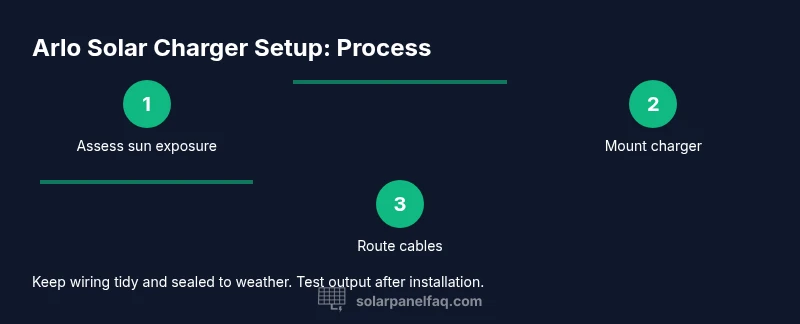
Safety and placement are the two pillars of a successful solar charging setup. Start by turning off or isolating the camera’s power input as you connect the charger. Mount the panel where it will receive direct sunlight for most of the day, avoiding shaded areas from trees or vent fans. Use weatherproof seals around any junction points to prevent moisture intrusion. Route cables along protected paths, using clips or conduits to avoid chafing or snagging on pedestrians or doors. If you’re installing on a roof, use fall protection and secure ladders; never work alone in high wind. Finally, inspect the connection after the first full sun day to verify that the camera’s charging indicator remains steady. Solar Panel FAQ emphasizes doing a quick test immediately after installation to catch any miswiring or misalignment early.
Maintenance, Cleaning, and Weather Considerations
A clean panel performs better. Periodically wipe the surface with a soft, damp cloth to remove dust, pollen, or bird droppings. Avoid harsh cleaners that could degrade coatings. Inspect seals, mounting brackets, and wiring every season for signs of wear, cracking, or looseness. In winter or coastal environments, salt spray can accelerate corrosion, so apply protective coatings or sealants if recommended by the charger’s manufacturer. Keep panels free of snow buildup and ensure the tilt mechanism remains smooth to maximize sun exposure. Monitoring the charger’s output over weeks helps you detect gradual performance declines and schedule maintenance before issues grow.
Troubleshooting Common Scenarios
If charging slows or stops, start with a quick hardware check: confirm the connector is seated, inspect for bent pins, and verify there’s direct sunlight on the panel. Check that the camera’s power input is functional and not blocked by debris. If the output drops under shade, relocate the panel or adjust tilt. For persistent issues, inspect weatherproof seals and inspect the mounting for water intrusion. In some cases, a simple repositioning or tightening of mounting hardware resolves fluctuations in voltage. The Solar Panel FAQ guidance recommends documenting any charging changes to spot patterns over time.
Cost, Warranty, and Longevity
Prices for Arlo solar panel chargers vary by wattage, mounting options, and included accessories. Expect a price range that reflects panel size, durability, and weatherproofing features. When evaluating value, consider the total cost of ownership across several seasons, including potential battery replacements avoided and reduced maintenance. Look for a warranty that covers the panel’s electrical output and the mounting hardware. Longevity depends on exposure to sun, precipitation, and temperature swings; a well-installed unit with proper protection can provide reliable service for several years, while harsh climates may necessitate more frequent checks. The Solar Panel FAQ team notes that long-term satisfaction comes from a combination of robust hardware and attentive upkeep.
Tools & Materials
- Arlo solar panel charger(Ensure model compatibility with your Arlo camera before purchase)
- Mounting hardware (brackets, screws, anchors)(Use exterior-grade, corrosion-resistant fasteners)
- Weatherproof sealant or gasket tape(Optional for extra moisture protection around connectors)
- Screwdriver set(Phillips and flathead sizes as needed)
- Drill with appropriate bits(Needed for masonry walls; optional on wood surfaces)
- Cable clips or conduit(Keeps wiring tidy and protected from wear)
- Safety gear (gloves, eye protection)( outdoor installation requires basic personal protection)
- Voltage tester or multimeter(Helpful for verifying output voltage during tests)
Steps
Estimated time: 60-90 minutes
- 1
Prepare mounting location
Identify a sunny, unobstructed spot with minimal shade for most of the day. Check that the surface is sturdy enough to support the panel and that the route to the camera input is direct and safe. Gather all tools and perform a quick safety check before you begin.
Tip: Measure the mounting angle for seasonal sun optimization to maximize daily output. - 2
Attach mounting bracket
Install the mounting bracket or frame according to the charger’s instructions. Use exterior-grade screws and ensure the mount is level. Leave space for cable routing to prevent pinching.
Tip: If mounting on uneven surfaces, use shims to achieve a level panel orientation. - 3
Mount the solar panel
Secure the solar panel to the bracket, ensuring all fasteners are tight and weatherproofed. If you’re mounting on a wall, avoid attaching near roof edges where debris could accumulate and affect performance.
Tip: Double-check that the panel is facing true south (or your local optimal direction) for most sun exposure. - 4
Route and secure cables
Run the power cable to the Arlo camera input using clips or conduit to protect from physical damage. Seal any entry points in exterior walls with weatherproof sealant. Keep cables away from moving parts or high-traffic areas.
Tip: Use cable clips at regular intervals to prevent sagging and reduce wear. - 5
Connect to the Arlo camera
Connect the charger’s output to the camera’s power input, following the included wiring diagram. Confirm polarity is correct and secure connectors. If the charger supports a test mode, enable it to verify voltage output.
Tip: Start with a low-output test on a sunny day to confirm basic operation before full deployment. - 6
Test and monitor
Power up the camera and check the charging indicator. Monitor the charger’s performance for the first full sun day and adjust tilt if needed. Record initial voltage and camera battery status for future reference.
Tip: Keep a simple log of daily output to detect trends and schedule maintenance.
Frequently Asked Questions
What is an Arlo solar panel charger and what does it do?
An Arlo solar panel charger is an exterior solar-powered accessory that keeps Arlo cameras charged by harvesting daytime energy. It reduces battery swaps and increases uptime, especially in remote or outdoor locations.
An Arlo solar panel charger is a solar-powered accessory for Arlo cameras that helps keep them charged outdoors, reducing battery changes.
How do I install it safely?
Install on a stable surface with direct sun exposure, use weatherproof seals, and route cables away from doorways and moving parts. Always disconnect power before wiring and test voltage after setup.
Mount in a sunlit spot, seal connections, and test the output after wiring.
Can I use it with all Arlo camera models?
Compatibility depends on the camera model and the charger's output connector. Check the manufacturer’s guidelines for your specific Arlo model before purchasing.
Check your model's guidelines to confirm compatibility with the charger.
What maintenance is required?
Regularly clean the panel surface, inspect seals, and verify mounting stability. Recheck connections after severe weather and re-tension mounting hardware as needed.
Clean the panel, inspect seals, and ensure mounting stays secure.
What affects charging efficiency?
Sun exposure, panel tilt, temperature, and the camera’s power draw all affect efficiency. Warmer days can reduce panel efficiency slightly, while deeper shade dramatically reduces output.
Sun exposure and angle affect efficiency more than you might expect.
What should I do if charging is slow?
Increase sun exposure by re-tilting the panel toward the sun, ensure firm mounting, and inspect for shade or obstructions. If needed, test with a known-good charger to verify camera input.
Tilt for more sun, check shade, and test with another charger if possible.
Watch Video
Top Takeaways
- Choose the right wattage for your camera model
- Mount for maximum sun exposure and secure weatherproof wiring
- Inspect seals and connections regularly to prevent moisture problems
- Verify warranty and compatibility before purchase